You raised the price of the burger by a dollar. Now you're weighing whether to reprint 80 menus, live with a discrepancy, or put a sticker over it. None of those options are good. The fix is a menu system where every change goes live near-instantly, everywhere, with no reprinting. Here's how to build one, and how to run it in daily service without losing your mind.
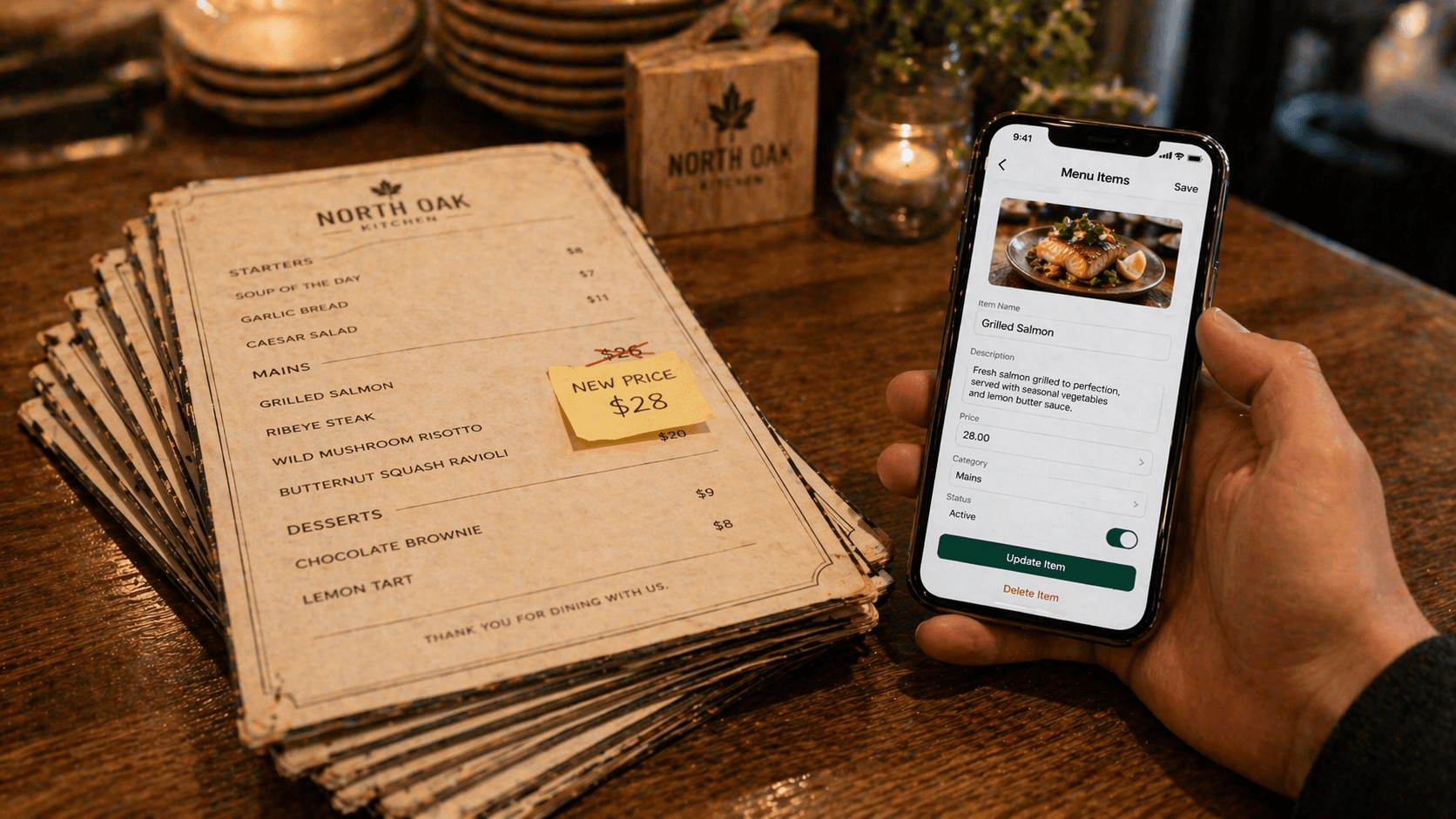
The real cost of reprinting menus
Reprinting is rarely just the print shop invoice. The real cost adds up fast:
- Print and paper. Obvious, and usually underestimated because nobody tracks it.
- Design time. A small tweak to a single item still requires someone opening the design file.
- Time between decision and live. A week is normal. That's a week of lost margin.
- Waste and reorder cycles. Minimum order quantities force you to print too many or too few.
- Opportunity cost. You stop making small changes you'd otherwise make, because each one triggers a reprint.
That last one is the quiet killer. The restaurants running the best menus in 2026 are iterating weekly — new specials, tested descriptions, seasonal swaps. That only works if the cost of a change is near-zero.
What “instant updates” actually requires
Three things have to be true for “instant” to really mean instant:
- The menu is hosted, not printed. Your source of truth lives in a database, not a PDF.
- Guests reach it dynamically. QR to a stable URL, or NFC to a rewritable destination.
- Caching is handled correctly. A guest who just scanned should see the updated menu within a minute, not whenever their phone decides to refetch.
If any of those three break, you'll discover it mid-service when a table orders a dish that's been 86'd for an hour. Test the caching behavior before you go live — it's the part vendors are most likely to fudge.
4 ways to make your menu live
Four credible patterns, ranked by how well they hold up in daily service:
1. NFC tag → hosted menu web app (best)
Tap the tag, menu loads from the web app, updates push in near real-time. The tag itself is rewritable, so you can repoint it at new content without touching hardware. Best combination of speed, analytics, and flexibility. More on the trade-offs in NFC vs QR for restaurants.
2. QR code → hosted menu web app
Same hosted menu, QR for access. Works fine; the friction is on the scan side, not the update side. Good fallback option if NFC isn't in budget.
3. QR code → hosted PDF (fragile)
Update the PDF on your server, and the next scan pulls the new file. The problem: PDF rendering on mobile is slow, not responsive, and caches aggressively. Guests frequently see stale PDFs for hours after an update. Not recommended unless you have no other option.
4. POS-integrated menu (overkill for most)
Pull menu content directly from your POS. Changes in one place. Sounds great; in practice, POS vendors ship menu UIs that lag behind dedicated menu platforms by years. Worth it only if tight sync with ordering matters more than menu UX — usually that's a multi-location or QSR decision.
Tip
Most small independents should pick option 1 or 2. The POS-integrated path is attractive on paper and disappointing in practice unless you have the engineering budget to build a better UI on top.
Step-by-step: update your menu in under 5 minutes
Once your menu is live on a hosted platform, the actual update sequence is trivial:
- 1
Open the dashboard on your phone
Your platform should work on mobile so you can update from anywhere — line check, dinner service, or home.
- 2
Find the item
Search or navigate to the section. Good platforms index by item name; bad ones force you to click through three levels.
- 3
Edit the field
Change the price, edit the description, or mark sold-out. Single-field edits should not require a full item re-save.
- 4
Publish
Save. Most platforms push to every device within 60 seconds. Some require a manual “Publish” tap — check which model yours uses.
- 5
Verify on your own phone
Pull out your phone, tap or scan the menu target, confirm the change is visible. This 10-second check has saved a lot of owners a lot of pain.
Screenshot coming soon
Updating a menu item price and toggling a sold-out item from the Tappflow dashboard on mobile.
Handling specials, sold-outs, seasonal swaps
The same instant-update system unlocks a few daily operations patterns worth baking in:
- Daily specials. Publish before each service. A dedicated “Today's Specials” section — or a separate NFC tag — beats overwriting the main menu.
- Sold-out toggle. One tap from a server's phone. No need for a ticket back to the kitchen or a shouted “86 the salmon!”
- Seasonal swaps. Duplicate your winter menu into a “draft”, make spring changes, publish when ready.
- Event menus. Mother's Day brunch, Valentine's tasting — preview, schedule, auto-revert after the service.
The general principle: small, frequent changes. The whole point of instant updates is to remove the mental tax on iteration. Use it.
Price-change best practices
Price changes are where instant updates can bite you. A few rules that keep trust intact:
- Avoid mid-service changes. Change prices between services, not during. Guests who saw $14 and get charged $15 will (rightly) push back.
- Honor printed prices during transition. If you've got any printed menus in circulation, the printed price wins until the stack runs out.
- Batch small increases. A cent-at-a-time creep looks worse than a single, clear annual adjustment.
- Test cache behavior once a month. Update a price, scan the menu 30 seconds later. If the old price persists, your platform has a caching problem you need to escalate.
- Keep a change log. Most platforms don't ship one — track your own in a shared spreadsheet if needed. Useful for staff training and for audits.
Platforms like Tappflow store the menu in one source of truth and resolve each tap or scan against the current version, so a price saved from a phone between services is live for the next table. Variant-level pricing, dietary-tag toggles, and tap-to-call-waiter cover the mid-service exceptions that used to need a paper ticket. The whole thing is built to run from a phone.
Instant updates are the single most durable reason to move off printed menus. Every other upgrade — analytics, loyalty, review capture — is downstream of having a source of truth you can change in 30 seconds.
Frequently asked questions
On most platforms, the next guest who taps or scans sees the updated menu. Guests already viewing the menu will see the update on their next interaction or refresh. Ask any vendor specifically: 'How long until a price change is live on a guest's phone?' — caching behavior varies.
Yes — most digital menu platforms have a one-tap 'sold out' toggle from a phone. The item either greys out or disappears, and guests stop trying to order it.
It depends on the platform. Some use long caches and serve stale prices until the guest refreshes. Others re-check on every interaction. Test this before committing: update a price, wait 30 seconds, reload the menu on a different phone, and see what you get.
For ambiance and for guests who prefer paper, yes. Keep a small stack of static menus and rely on digital for dynamic items like specials, 86s, and time-of-day changes.
See Tappflow at work in your restaurant
NFC tags, a digital menu, and instant updates — built together so you never reprint a menu again.